ENG

SUPPORT

FAQ Trial License Training Quote Tech Support Distributors

FAQ

Total 37 number of articles

Search FAQ
Q
A
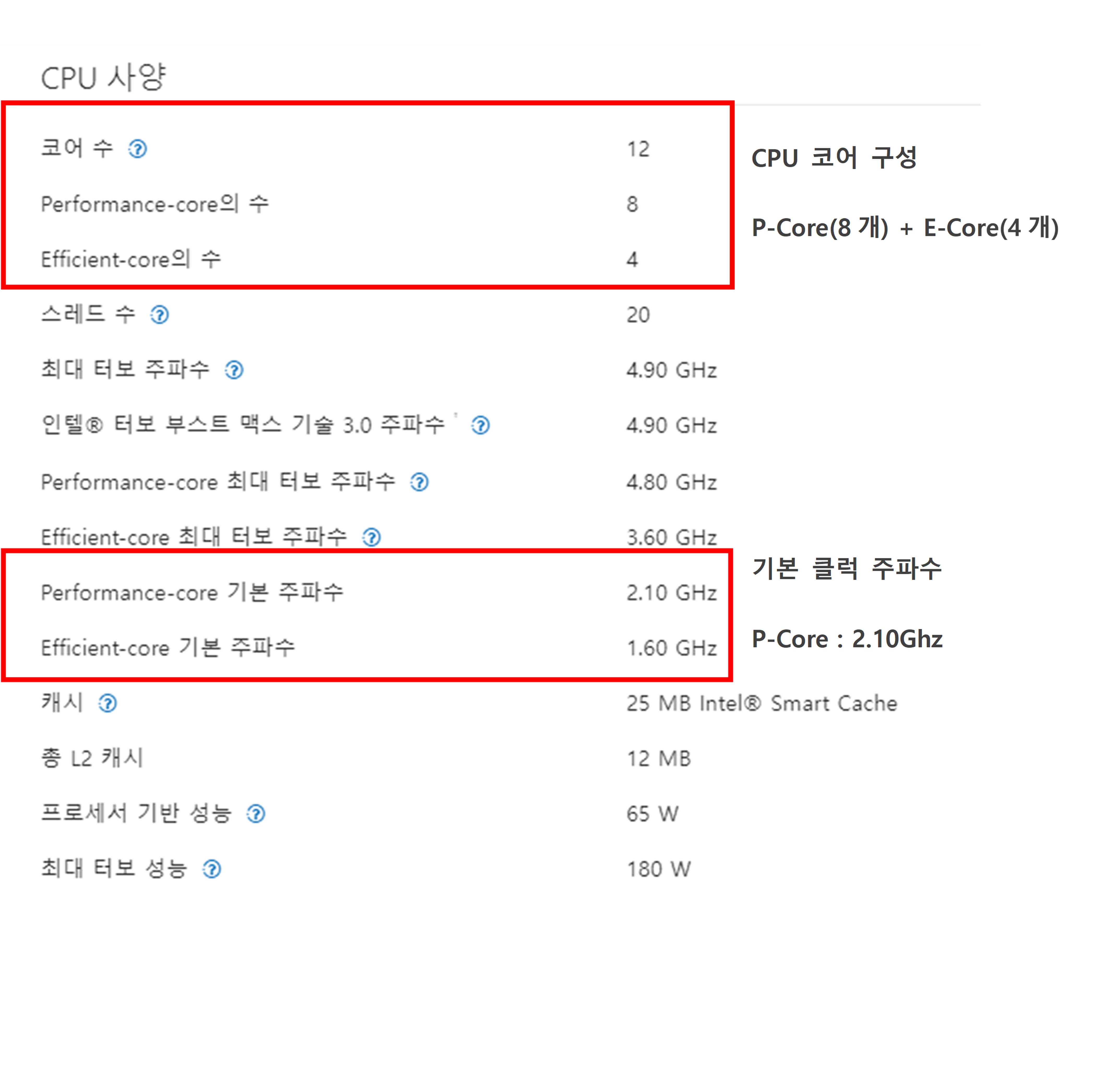
The number of P-Cores and E-Cores may vary depending on PC specifications, so please use the core settings below in conceptual terms.
 
Example)

• Intel Core i7-12700 specification with 8 PCores and 4 ECores
• Default clock base of 2.1 Ghz for P-Core and 1.6 Ghz for E-Core
 

[Intel 12th Generation and later core settings options]


Option

WMX Engine Driving Performance

System Stability

System Resource Utilization

Hyper Threading

E-Core Enable

WMX Engine Core

1

Upper

Upper

Middle

No
(
Total number of cores : 8)

No

P Core

2

Upper

Middle and Upper

Middle and Upper

Yes
(
Total number of cores : 16)

No

P Core

3

Middle and Upper
(About
 80~90%)

Middle

Upper

Yes
(
Total number of cores : 20)

Yes

E Core


[Uptility according to the above options]


Option 1) Utilizing P-Core in the WMX Engine can improve the performance of the WMX Engine the most, and since Hyper Threading and E-Core are not used, the system stability is the most, but the resource utilization on the PC is limited.


=> Actual number of cores set for Windows and RTX: Windows Core 7, RTX Core 1


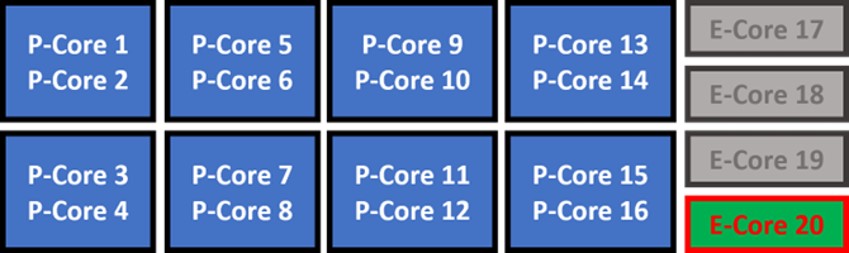
Option 2) Utilize Hyper Threading, but with limited Windows Core allocation (allocating only 14 Windows), it provides maximum resource allocation to user applications while keeping separate RTX Core threads away from the Windows side. 

However, the Hyper Threading option makes the system less reliable than when not in use.


=> Actual number of cores set for Windows and RTX: Windows Core 14, RTX Core 1 (or 2)
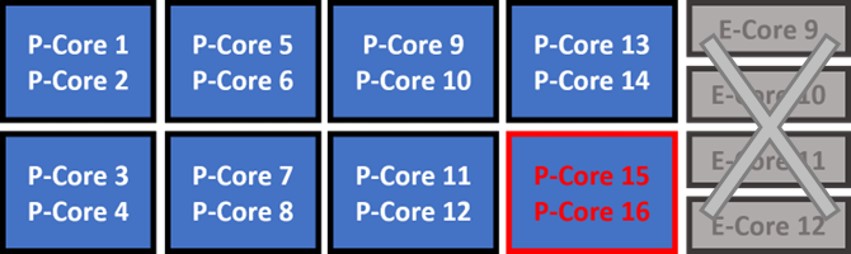


Option 3) The WMX Engine uses E-Core based on architecture that has changed since Intel's 12th generation, all P-Core resources are assigned to the user application, and WMX uses E-Core, which can be proposed when the user application needs a lot of computing power.

However, the system stability is relatively lower than the above two options, and the WMX Engine's processing performance is reduced by about 10-20%.


=> Actual number of cores set for Windows and RTX: Windows Core 16, RTX Core 1 (or 2)


Overall, the more system resources you use, the less reliable you are, and to increase system stability, you need to limit variable resource utilization capabilities such as hybrid architecture and Hyper Threading to increase system stability.




Q
A
The content may not be visible due to each user's PC settings.

After downloading, check 'Unblock' in File Properties-General Tab-Security Item.

Q
A
The physical layer of EtherCAT is Eternet, so the hardware specification is the same.
The cable length limit between each node is up to 100M, which is why the physical layer of most recently developed field buses is based on Ethernet.

However, even if the physical specification is 100M, these long cables can cause large transmission times and cause synchronization problems when using the DC Sync feature of the EhterCAT.
Q
A
Communication jittering refers to a temporal wobble in real-time conditions. For example, when a Slave needs to execute an instruction exactly in a periodic cycle, it can deviate from the reference time. This results in a temporal jitter of +1 or -1 (or more), which is called a communication jitter. There are several reasons for the occurrence of jittering, but the main influencing factors are noise, Slave's CPU clock unevenness, and the mismatch in transmission speed due to the length of the cable.
Q
A
Recently, the software technique has remained the same, but the hardware level of PC is greatly improving.
Recent hardware CPUs typically involve quad-core processing of common equipment sequences and UIs, leaving more resources. As software techniques have not yet advanced in parallel processing these multicores, resources on PCs running most equipment programs account for 15 to 30 percent of the total resources.
In this situation, when one core is assigned and processed in RTX, it becomes a completely separate parallel process, but when two or three more cores are assigned to RTX and implemented separately for each role, it also enables multi-controllers that make the most of their hardware.                                                                                                  
For example, based on the quad core, the first core is a sequence of equipment, the second core is motion-only, the third core is vision-processed, and the fourth is GUI-processed, and the hardware of the PC of the equipment can be 100% displayed.
Q
A
The real-time system we use is a product from IntervalZero in the United States, which is also certified by Microsoft.
It has a category of hard real-time with a high-priority real-time task processing that uses the CPU (core) in a completely destructive manner and independently of any Windows process.
(Hard Real-time: a system that maintains a set DeadLine unconditionally)
RTX also has a separate, independent Hardware Abstract Layer (HAL), which allocates an independent CPU core that Windows cannot engage with to handle the tasks.
WMX is a soft motion engine based on this, and since 2005, it has accumulated know-how on programs in real time, making the best use of it.

Frequently asked questions with regards to our products are listed here.
Please click [Don't have the question you're looking for?] should you have further questions.
We will contact you shortly.

Don't have the question you're looking for?